SmartLine Detailed Overview
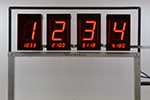
The eTekGadget SmartLine Finish Line Timer supports up to 8 lanes with instant race results resolved to .00005 seconds. You may send the race times to a computer for storage, analysis and display by any of the popular race management software packages. The SmartLine Timer shows the placement result as it occurs on large bright red 2¼ inch displays attractively mounted above each lane. They are easily seen across a large room.
Computer interface included as part of the standard package --
The SmartLine Finish Line Timer includes the computer interface as part of the
standard package.
Our timer is packed with valuable options, test functions and smarts.
Use our free utility program to change many of the parameters without having to
know the commands. You can also use our program to easily test the sensors
and switches on the timer.
You may use the timer without connecting it to a computer, however there are several software programs
available that help you manage the race. They really make the job much easier. You can
project the computer screen image onto the wall so that the spectators can see the race results.
They thoroughly enjoy watching who is going to race next, what the times of the racers are
and, yes, who won.
SmartLine's generous 6-inch clearance above track and custom or standard width --
The SmartLine Finish Line Timer is made with
generous 6-inch clearance above the track. The clearance above the track allows for flexibility in the height of
the race cars, semi-truck or whatever else you are
racing. The leg of the timer is 8 inches long so the clearance may be more on some thin tracks.
The width of the finish line is dependent
on the width of your track. You may specify
any width up to 32 inches wide and any number of lanes up to 8 per
track. The standard spacing from center to center is 3.5 inches. If
your lane spacing is not standard or the spacing is greater than 4 inches apart, just tell us the dimensions and we can make one to fit your
needs.
You need to specify either the track manufacturer (BestTrack or Piantedosi) or the dimensions of your track when you order a timer. The dimensions of the entire width of the track and the distance from the left
side of the track to the center of each lane are necessary on non-standard tracks. This is so that the sensors
may be placed into the bar of the timer at the
correct locations and the bar and panel may be cut
to the correct size for your track. BestTrack
and Piantedosi Oars will pre-drill their tracks
for our timer. We make a standard mount
for these tracks.
SmartLine Timer remembers settings --
You can use our Utility Program that is included with the timer to easily
set your preferences. GrandPrix Race Manager sets the parameters in the timer automatically when you
select our timer in their hardware setup section. The preferences that you enter are saved in non-volatile
memory. The timer will remember the preferences you set the next time you turn it on. The number of physical
lanes, the number of decimals, the length of delay time for the automatic reset or other timed functions, the lane order,
and other parameters are stored in the timer.
SmartLine's automatic reset --
The automatic reset may be set to any value between 1 and 255 seconds. It may be set to 0 if you wish to use a
program to send a reset command or you want to press the physical reset button after the race
is complete.
The displays will go blank ready for the next race when the timer has been reset. If the start gate switch has not been closed
a decimal point will be displayed until the start gate is made ready for a new race (closed). The displays will
also show if there is an obstruction, such as a car, under the sensors by showing a small c until it is
removed. When the displays are blank, you are ready for a new race.
SmartLine Timer works with all Remote Start Gates --
The timer resets only when the automatic timeout is reached, the computer sends a reset command from the program you are using or
the reset button is pressed. The Remote Start Gates available on the market do not affect the timer in any way.
The timing in our timer may be started by connecting the start switch terminals to some Remote Start Gates. Check with the
RSG supplier for details.
SmartLine's Utility Program -- LineSetup --
We supply a Utility Program called LineSetup with every timer. It allows you to click on
buttons in the windows style to set the parameters in the timer and test the timer's sensors. You do not have to learn
any of the commands that are sent to the timer. It is very easy to use. Just double click on the
filename "LineSetup4.exe" to run the program. Contact us if you need a copy of this software.
The SmartLine Finish Line Timer may also be tested without the use of the utility program by simply holding the reset
button down for 3 seconds, until the displays show the letter L. You may test the sensors by moving your hand or other object
between them. The display will show a lower case c when there is an object between the sensor and illuminator.
There are built-in sensor IR illuminators so that no external lamps are required.
The start gate switch may be tested by simply pressing the switch. The displays will show a decimal point when the switch is closed.
To exit the test mode, all you need to do is press the reset button.
 Back
to top
Back
to top

SmartLine Finish Line System

|
SmartLine system computer unit.
|
|
|
Display for each lane.
|
|
|
LED and Sensor for each lane.
|
|
|
SmartLine LineSetup Program and manuals on CD.
|
|
|
12V A/C Power Adapter.
|
|
|
5' Serial (RS-232)
cable built into timer.
|
|
|
50' Serial (RS-232)
cable.
|
|
|
Reset/Start gate switch included on 50' cable.
|
Back
to top
SmartLine Commands
You may also use a generic terminal program for
communicating with the finish line in which case
you would have to use the commands. The
complete list of commands are documented in the SmartLine
Command Manual. The
list of commands are supplied for anyone creating their own programs or who
already have a program that requires the commands.
Please contact us if you have any questions about
these commands or any other software issues.
The
SmartLine lower case commands
were created to allow for a more flexible command structure and to create
additional commands. The lower case commands
have been implemented by the GrandPrix Race Manager
and DerbyMaster software packages.
Back
to top